Make Learning Independent.
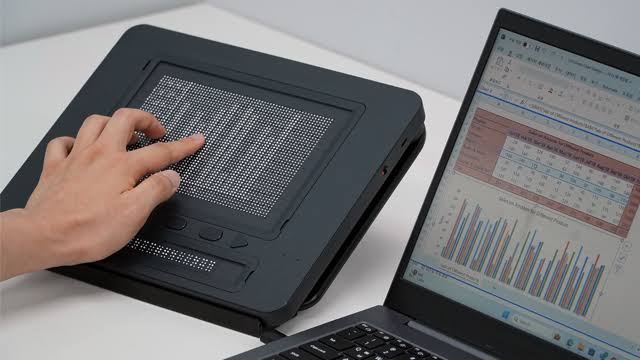
Tactile access is essential to learning. Dot Pad helps blind and low-vision students explore diagrams through touch, using tactile graphics prepared with compatible software.

How it Works
01
Connect
Pair Dot Pad with the device you already use for class.
02
Send
Convert charts, maps, and diagrams into tactile output.
03
Feel
Read Braille and tactile graphics directly under your fingers.
04
Explore
Pan, zoom, and review each graphic at your own pace.
Why Dot Pad
Why Tactile Matters
Review figures from a problem set at midnight, on your own, without booking anyone's time to describe them.

01
Explore Diagrams Through Touch
Read prepared charts, maps, and diagrams as tactile graphics, with time to explore details independently.
02
Support Learning During Class
Use compatible software and prepared tactile materials to explore course visuals during lectures and study sessions.
03
Build a Reusable Tactile Library
Prepare and save tactile resources for students to revisit. Complex diagrams may still need adaptation and specialist support.
Key Features
A Better Way to Deliver Tactile Access
Prepare tactile learning resources with compatible software, then save and reuse them on Dot Pad. The time and support needed depend on the complexity of each diagram.

Dot Canvas
Create It, Store It, Read It.
All in One Place
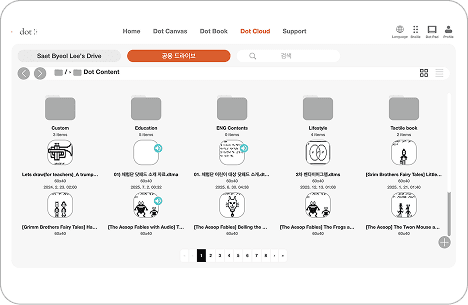
Dot Canvas, Dot Cloud, and Dot Pad work as one system. Disability services staff prepare tactile material, students open it on their own device, and nothing gets lost in between.


Tutorials
Tutorials for Getting Started With Dot Pad


FAQ
Dot Pad FAQ
Dot Pad is a refreshable tactile display. Its 300-cell graphic display uses 300 movable dots to form tactile graphics; a separate Braille display presents text. Supported content and features depend on the software and device setup.
Dot Pad works seamlessly with the world's leading screen readers, including JAWS for Windows, NVDA, and Apple VoiceOver.
Screen readers provide spoken or Braille access to digital content. Dot Pad adds tactile access to supported graphics so students can explore shapes and spatial relationships alongside accessible text and descriptions.
Some materials still need specialist adaptation or tactile transcription. Dot Pad can support reusable digital tactile resources, but complex diagrams require preparation and review for meaningful access.
Dot Canvas supports preparing and editing tactile content, while Dot Cloud provides file storage and shared resources. Contact the Dot team to confirm software compatibility and what is included in your setup.
Contact the Dot team to discuss a demonstration, your course materials, compatible devices, and the support your students and staff need.
FAQ
Dot Pad FAQ
Dot Pad is a refreshable tactile display. Its 300-cell graphic display uses 300 movable dots to form tactile graphics; a separate Braille display presents text. Supported content and features depend on the software and device setup.
Dot Pad works seamlessly with the world's leading screen readers, including JAWS for Windows, NVDA, and Apple VoiceOver.
Screen readers provide spoken or Braille access to digital content. Dot Pad adds tactile access to supported graphics so students can explore shapes and spatial relationships alongside accessible text and descriptions.
Some materials still need specialist adaptation or tactile transcription. Dot Pad can support reusable digital tactile resources, but complex diagrams require preparation and review for meaningful access.
Dot Canvas supports preparing and editing tactile content, while Dot Cloud provides file storage and shared resources. Contact the Dot team to confirm software compatibility and what is included in your setup.
Contact the Dot team to discuss a demonstration, your course materials, compatible devices, and the support your students and staff need.
Contact Us
Get Answers About Dot Pad

Make Learning Independent.
Dot Pad helps blind and low-vision students explore diagrams through touch, using tactile graphics prepared with compatible software.
How it Works
01
Connect
Pair Dot Pad with the laptop, tablet, or phone you already study on.
02
Send
Convert charts, maps, and diagrams into tactile output.
03
Feel
Read Braille and tactile graphics directly under your fingers.
04
Explore
Pan, zoom, and review each graphic at your own pace.
Explore Dot Pad
Access STEM graphs, charts,diagrams
and maps in real time


Public


Charts

Images

Books

Dot Book
Dot Canvas
Dot Cloud
Why Dot Pad
Why Tactile Matters
Review figures from a problem set at midnight, on your own, without booking anyone's time to describe them.
01
Explore Diagrams Through Touch
Read prepared charts, maps, and diagrams as tactile graphics, with time to explore details independently.
02
Support Learning During Class
Use compatible software and prepared tactile materials to explore course visuals during lectures and study sessions.
03
Build a Reusable Tactile Library
Prepare and save tactile resources for students to revisit. Complex diagrams may still need adaptation and specialist support.

Key Features
A Better Way to Deliver Tactile Access
Dot Canvas
Create It, Store It, Read It.
All in One Place
Dot Canvas, Dot Cloud, and Dot Pad work as one system. Disability services staff prepare tactile material, students open it on their own device, and nothing gets lost in between.
Tutorials
Tutorials for Getting Started With Dot Pad
Success Stories from Global Users





FAQ
Dot Pad FAQ
Dot Pad is a refreshable tactile display. Its 300-cell graphic display uses 300 movable dots to form tactile graphics; a separate Braille display presents text. Supported content and features depend on the software and device setup.
Dot Pad works seamlessly with the world's leading screen readers, including JAWS for Windows, NVDA, and Apple VoiceOver.
Screen readers provide spoken or Braille access to digital content. Dot Pad adds tactile access to supported graphics so students can explore shapes and spatial relationships alongside accessible text and descriptions.
Some materials still need specialist adaptation or tactile transcription. Dot Pad can support reusable digital tactile resources, but complex diagrams require preparation and review for meaningful access.
Dot Canvas supports preparing and editing tactile content, while Dot Cloud provides file storage and shared resources. Contact the Dot team to confirm software compatibility and what is included in your setup.
Contact the Dot team to discuss a demonstration, your course materials, compatible devices, and the support your students and staff need.
FAQ
Dot Pad FAQ
Dot Pad is a refreshable tactile display. Its 300-cell graphic display uses 300 movable dots to form tactile graphics; a separate Braille display presents text. Supported content and features depend on the software and device setup.
Dot Pad works seamlessly with the world's leading screen readers, including JAWS for Windows, NVDA, and Apple VoiceOver.
Screen readers provide spoken or Braille access to digital content. Dot Pad adds tactile access to supported graphics so students can explore shapes and spatial relationships alongside accessible text and descriptions.
Some materials still need specialist adaptation or tactile transcription. Dot Pad can support reusable digital tactile resources, but complex diagrams require preparation and review for meaningful access.
Dot Canvas supports preparing and editing tactile content, while Dot Cloud provides file storage and shared resources. Contact the Dot team to confirm software compatibility and what is included in your setup.
Contact the Dot team to discuss a demonstration, your course materials, compatible devices, and the support your students and staff need.
Contact Us